When a security scanner reports an issue in your code, the next step isn’t always obvious. You might see a warning, but understanding the root cause and applying the correct fix often means leaving your editor to search documentation or external resources.
SecureFlag Findings2Training simplifies that process. Built for both Visual Studio Code and IntelliJ IDEA, this new extension connects security findings in your IDE directly to targeted training content and hands-on labs.

Works With Existing Scanners
Findings2Training makes your existing security tooling more useful, rather than replacing it. The extension works with any scanner that reports issues in your IDE, such as Snyk and Semgrep.
When a security scanner reports an issue, the extension:
-
Detects the warning in your Problems panel or window.
-
Sends only the text of the issue (not your code) to the SecureFlag API.
-
Matches it to the most relevant training article and practice lab.
-
Shows Quick Fix options in your editor.
Security Training That Meets You Mid-Code
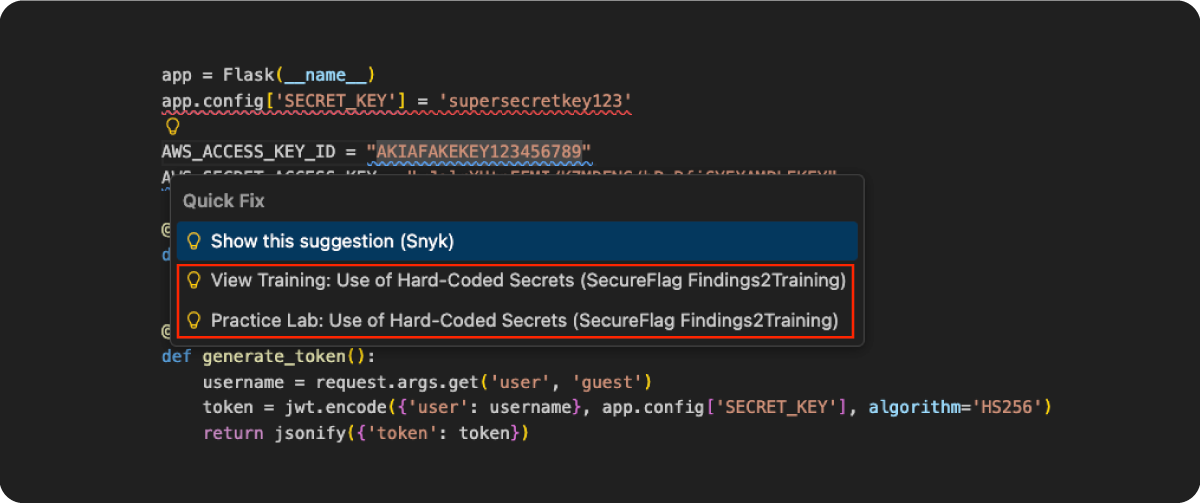
The results land directly in your editor as inline Quick Fix suggestions, with the same familiar lightbulb menu you already use for code fixes. Click on a flagged line, and you’ll see two options from SecureFlag:
-
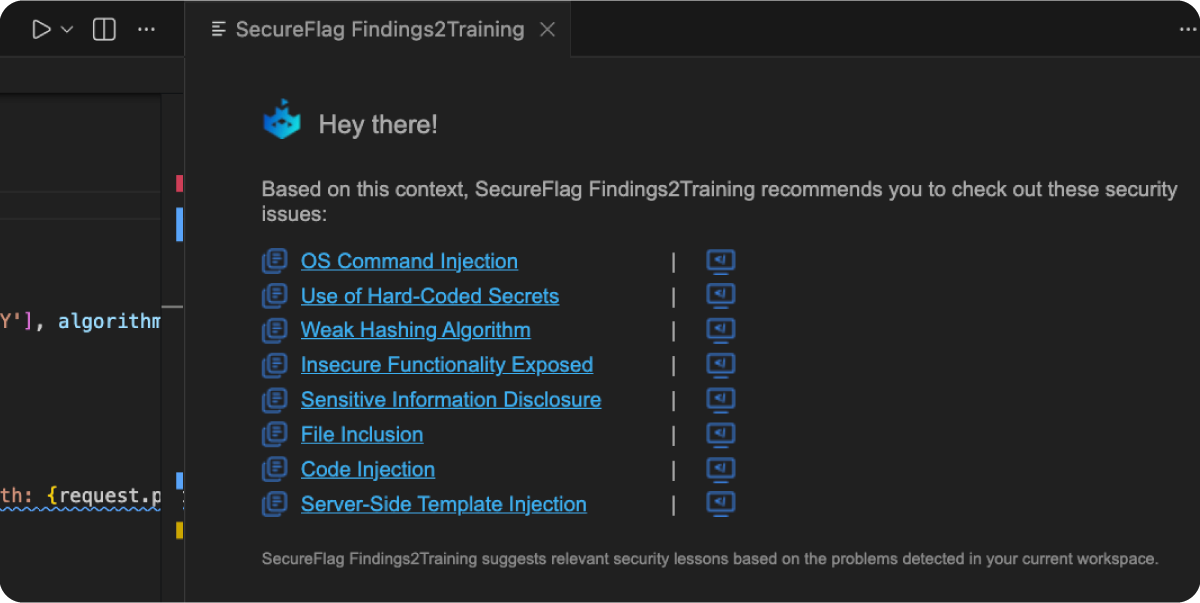
View Training: Opens a detailed explanation of the vulnerability in a panel right beside your editor, complete with secure coding examples and remediation guidance. You can read and code simultaneously without switching windows.
-
Practice Lab: Launches a hands-on exercise in your browser so you can work through the vulnerability yourself. Fixing vulnerabilities under realistic conditions is what makes the lesson more likely to be remembered.
Two Ways to Analyze
The extension can be run automatically or, if you’d prefer more control, on-demand.
- Automatic analysis: Runs in the background from the moment your API token is configured. Whenever scanner warnings appear or change in your workspace, the extension picks them up and runs an analysis without you having to do anything.
When the analysis is complete, your Quick Fix recommendations are ready.
- Manual analysis: If you want to take a more proactive approach, you can run a fresh scan at any point, whether you’re doing a pre-commit check or just want to make sure nothing has been missed.
Privacy and Security by Design
We understand that source code is sensitive and needs to remain protected. Findings2Training is intentionally designed so that:
-
Only the text of security warning messages is sent to the SecureFlag API.
-
No source code, file contents, variable names, or credentials are transmitted.
-
Your proprietary logic never leaves your machine.
You get the full benefit of contextual training without compromising code confidentiality or your organization’s compliance requirements.
Get Started in Three Steps
Getting started is simple and fast:
-
Search for SecureFlag Findings2Training in the VS Code Marketplace or JetBrains Marketplace and install it.
-
Generate an API Access Token from the SecureFlag Management Portal (Settings → API Access Tokens).
-
Paste your token into the extension settings.
From that point on, the extension works automatically alongside whatever security scanner you have active in your workspace.
For more detailed setup instructions, check out our VS Code or IntelliJ IDEA help pages.
Requirements
-
VS Code 1.83.0 or later, or IntelliJ IDEA 2023.1 or later
-
An active SecureFlag account
The VS Code extension is also available via the Open VSX Registry for VS Code-based IDEs outside the standard Marketplace.
Helping Developers Write More Secure Code
Findings2Training is part of the wider SecureFlag platform, which provides development teams with a library of thousands of hands-on security labs, structured learning paths, and a knowledge base covering the full range of application vulnerabilities.
If your team is just starting to build security awareness or looking to go deeper on specific topics, the platform is designed to make secure coding skills practical and measurable. Findings2Training brings that library directly into the tools your developers are already using every day.
Want to see how SecureFlag connects security findings to hands-on training across your development process?