Developer security training programs exist in many organizations these days, but once they’re in place, how do you measure whether they’re working or teams are making progress?
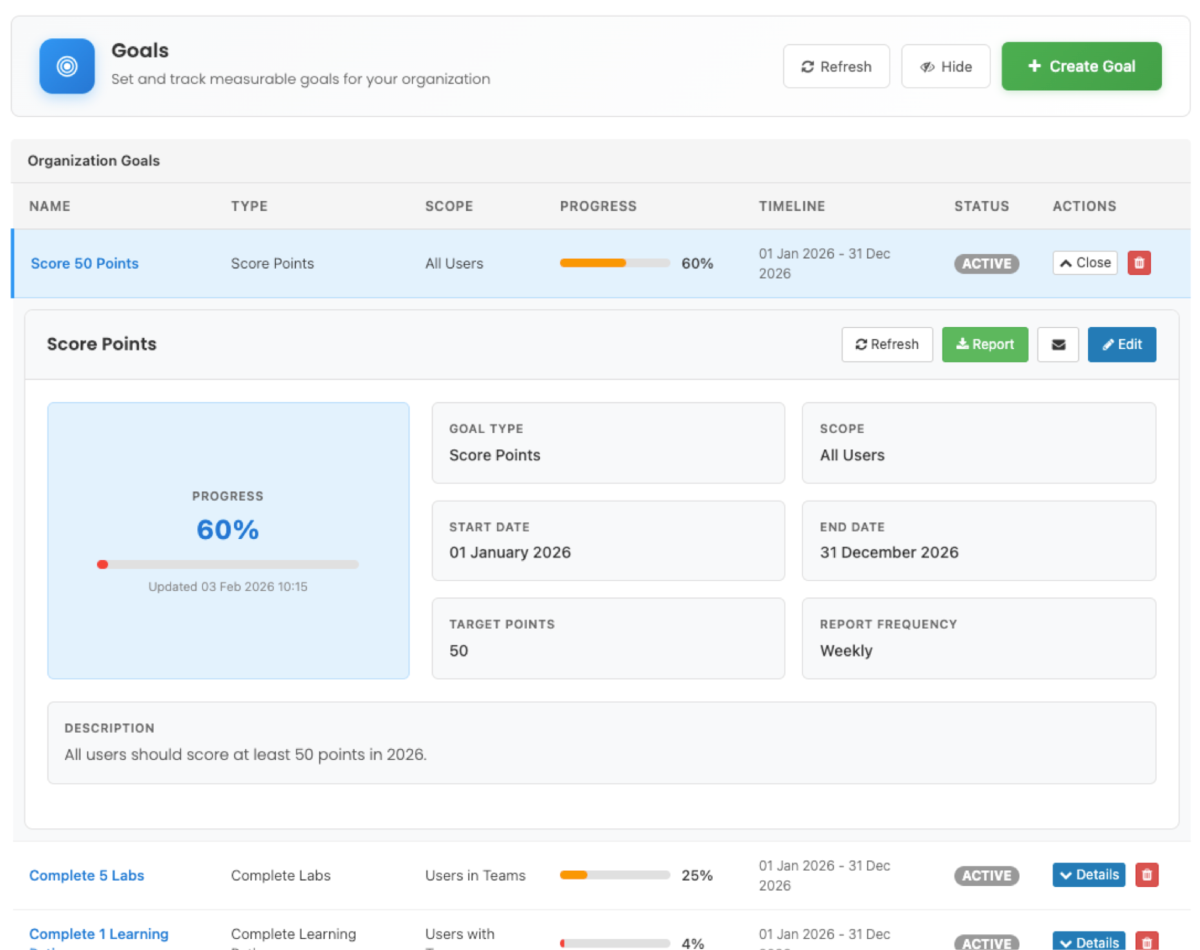
SecureFlag’s new custom reporting capability, Organization Goals, makes it easier to track your team’s security training progress.

Making Security Training Measurable
It can be time-consuming to create manual reports and chase status updates. Now you can define clear goals, set a timeframe, and let the platform automatically report progress back to you.
Not only does it reduce admin overhead, but it also provides insightful data to share with stakeholders, from managers to CISOs.
Organization Goals allow you to:
-
Track participation across development teams.
-
Encourage consistent learning activity.
-
Measure skill development over time.
-
Share progress with leadership or internal stakeholders.
Defining Training Goals in SecureFlag
You can define goals based on different types of activity that align with your training strategy.
Examples include:
-
Points earned: Users should earn at least 50 points.
-
Labs completed: Users should complete 10 labs.
-
Learning paths completed: Users should finish the PCI DSS Learning Path.
Given that SecureFlag training focuses on hands-on labs, these metrics provide a practical way to measure whether users are actively developing security skills.
Targeting Goals Across Teams
It’s possible to run separate goals for different parts of the organization. For example, you can tailor goals for backend engineers, your cloud infrastructure team, and your new-hire cohort.
Goals can be applied to:
-
All users in the organization.
-
Specific teams.
-
Users with particular tags.
Tracking Progress and Reporting
The platform lets you track progress through built-in reporting capabilities. When creating a goal, administrators can define the start and end dates for each goal.
This connects your training targets to business timelines, whether that’s a quarterly security review, a compliance deadline, or an ongoing annual program.
Once you set a reporting frequency, the platform will automatically send email updates on progress toward your goal. You can also generate reports on demand at any time, giving you the flexibility to check in whenever you need to.
These reports help to understand:
-
The teams that are actively engaging in training.
-
How users are progressing toward defined goals.
-
Where additional encouragement or support might be useful.
Use Case Examples
Here are a few examples of how Organization Goals can be applied in different ways:
Quarterly Security Training Drive
Set a goal for all developers to complete 10 labs and earn 100 points before the end of the quarter. Schedule weekly email reports to track progress without having to keep asking for updates.
New Hire Onboarding
Tag new joiners and define a goal that requires the completion of a specific onboarding learning path within their first 30 days. Track progress automatically and confirm compliance before probation reviews.
Team-Specific Compliance Targets
Run different goals simultaneously for different teams, such as a DevOps-focused learning path for the infrastructure team and web security labs for the front-end team. Each team is measured against criteria that are relevant to their role.
Executive Reporting
Generate on-demand reports ahead of board meetings or security reviews to show measurable progress toward your organization’s security training objectives, with clear data on goal completion rates across teams.
Ensuring Security Training Gets Results
Effective security training needs proper targets and consistent follow-through. Without them, training can easily become something that gets assigned but never really tracked, and hard to know whether it’s making any real difference.
Our new Organization Goals feature lets you define what you want your teams to achieve, scope it to the right people, and have SecureFlag automatically keep you updated on progress.
Along with SecureFlag’s hands-on labs and learning paths, you get a complete picture of how your teams are building security skills over time, and the data to back it up when you need it most.