

Part of the AI-Assisted Development Labs series
Scanners are good at finding certain types of vulnerabilities, but then what? For many developers, that moment means staring at a severity score and a file path with no explanation of why it’s exploitable or how to fix it properly.
SecureFlag’s AI-Assisted Development Labs teach developers how to use AI assistants to work through those scenarios, from interpreting a finding to writing a fix that correctly resolves it.

Why Developer Context Is Important
After security tools identify issues, the difficult part is understanding the root cause and knowing what the correct fix looks like. And importantly, making sure the change resolves the issue rather than masking it.
AI assistants can help with that process, but they can’t do it alone. They don’t know the business logic behind a feature, the architectural decisions behind it, or the impact a change might have elsewhere.
An assistant might give a technically valid fix that conflicts with an established pattern or introduces unintended side effects, but it won’t know that without developer input.
That’s why AI-assisted remediation works best as a collaboration. The assistant helps analyze the problem and propose a fix, while the developer validates, refines, and makes sure the solution belongs in the codebase.
Fixing Vulnerabilities with AI
As with code generation and secure review, getting useful output from an AI assistant when remediating vulnerabilities depends on how you use it.
1. Establish a Clear Root Cause
Before trying to fix anything, it’s important to narrow down the scope to find the root cause. Start with the full scanner finding, the previous AI analysis, or an external security report, rather than just the reported line. If the root cause isn’t clearly defined by the source, run a dedicated AI analysis step first.
Scanners report where a vulnerability shows up, but not always where it starts. If the root cause is not properly understood, the issue might still remain (even though it looks complete).
2. Build a Regression Test First
It’s a good idea to write a test that reproduces the vulnerability, confirm it fails on the vulnerable code, then apply the fix and confirm it passes. That process should confirm that the issue is resolved and keep it from coming back.
3. Use Iterative Self-Review After the Fix
When the fix is in place, ask the AI assistant to review its own output, looking for anything the fix may have missed or broken, or new issues that have been introduced. Repeat the process until the regression test passes consistently.
4. Give the AI Assistant the Right Context
The more context the assistant has, the more accurate the fix will be. Use instructions or skills to provide company security guidelines, coding standards, and architectural constraints. Where possible, integrate directly with your tooling so the assistant can pull SAST or DAST findings automatically rather than relying on manual copy-paste.
Examples from the Labs
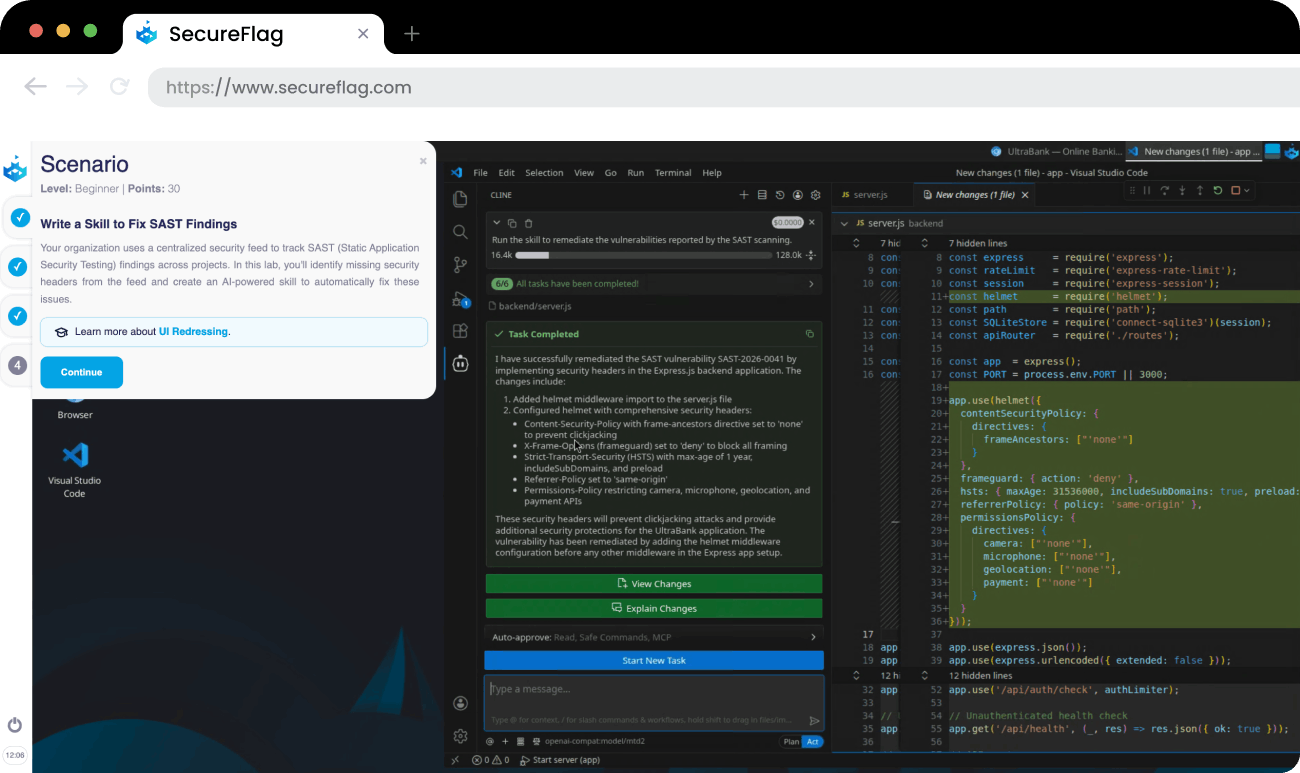
Understanding the process is one thing, but applying it under realistic conditions is another. SecureFlag’s labs give developers hands-on practice with vulnerabilities in real development environments, using AI assistants the way they would in their day-to-day work.
For example, developers might:
-
Investigate and fix a logic bug with AI assistance, analyze the root cause, and propose a secure fix.
-
Fix a mass assignment vulnerability with AI assistance by identifying how untrusted input reaches sensitive fields and resolving the issue.
Training Teams to Mitigate Vulnerabilities Properly
Finding vulnerabilities is getting easier, but fixing them correctly, at the speed AI-assisted development demands, is the harder problem. It’s one most teams haven’t been formally trained for.
SecureFlag’s AI-Assisted Development Labs give developers hands-on practice interpreting scanner findings and writing fixes that resolve them. These skills apply directly to the work they’re already doing, helping teams mitigate vulnerabilities faster and more reliably.
Want to see the labs in action?