
When software passes through QA testing, it means it’s functioning correctly, but has security been taken into account? Last year alone has seen a 34% rise in vulnerability exploitation, which is why security testing needs to be part of workflows alongside functional testing.
To deliver secure software, QA teams should test how things work as well as what could go wrong in terms of security. That’s precisely what SecureFlag’s QA hands-on labs are there to help with.

What is Security Testing?
The main aim of security testing is to identify and address any vulnerabilities in a software application, whether that’s in its design, code, or configuration. Nobody wants to find vulnerabilities in production, so it’s essential to test to avoid compromises, such as data leaks or unauthorized access.
It’s not just about stopping major hacks; you’d be surprised at how more subtle, hidden flaws find their way in, causing security risks. It’s about ensuring that:
-
Users can’t access information they shouldn’t.
-
Sensitive data stays private.
-
Known security issues don’t resurface in future releases.
The Importance of Regression Testing
Security testing can mean many things, from penetration tests to vulnerability scanning to secure code reviews. But within a typical development cycle, one of the most effective ways to catch issues early is through regression testing.
Regression testing shouldn’t necessarily be down to one team; it should be a shared responsibility across different teams, such as development, QA, and operations.
If applications aren’t being actively tested, it’s more a case of hoping for the best, rather than being confident that the application is secure.
Not doing this kind of testing leads to:
-
Releasing code with known or predictable vulnerabilities.
-
Fixing the same issues repeatedly because the regression tests didn’t cover security.
-
Exposing user data and risking compliance failures (hello, GDPR fines).
-
Post-deployment firefighting slows teams down.
Testing for known patterns and validating that security controls haven’t regressed helps reduce risk, avoid rework, and support faster, safer releases.
Security Vulnerabilities Caught by Testing
While any bug can affect performance or reliability, security vulnerabilities introduce far greater risks. Attackers can exploit these vulnerabilities for all kinds of purposes, including taking control of entire systems, often without any obvious signs that something’s gone wrong.
Security testing helps catch vulnerabilities such as:
-
Injection flaws: These include SQL and OS command injection, where untrusted input is executed as part of a command or query. A successful attack could let an attacker view or manipulate data they shouldn’t have access to.
-
Cross-site scripting (XSS): Malicious scripts injected into web pages can steal session cookies, redirect users, or deface interfaces, all without the user’s knowledge.
-
Broken authentication and session management: Weak session handling or flawed credential checks can lead to account hijacking or privilege escalation.
-
Security misconfigurations: Insecure admin panels, unnecessary services, or verbose error messages can reveal more information than intended and create unexpected attack surfaces.
-
Sensitive data exposure: Improper handling of personal or financial information, such as storing it in plaintext or transmitting it without encryption, can lead to breaches.
When Functional Testing Isn’t Enough
When the 2022 Optus data breach happened, attackers were able to access nearly 10 million customer records by exploiting a combination of an unauthenticated API endpoint and an Insecure Direct Object Reference (IDOR) vulnerability. It wasn’t a sophisticated hack.
The internal API didn’t require user authentication and failed to verify that the requesting user had permission to access the requested data. As a result, simply guessing or iterating over user IDs in API requests was enough to retrieve other users’ sensitive information.
Functionally, the system worked as expected, but from a security perspective, it exposed massive amounts of personal data. It’s the type of issue QA teams can help catch by testing authorization checks, user-level access patterns, and boundary conditions, not just standard functionality.
SecureFlag’s New Java QA Labs
As you can see, it’s imperative that security testing takes place to avoid such consequences, and SecureFlag’s practical training for test engineers is a good start.
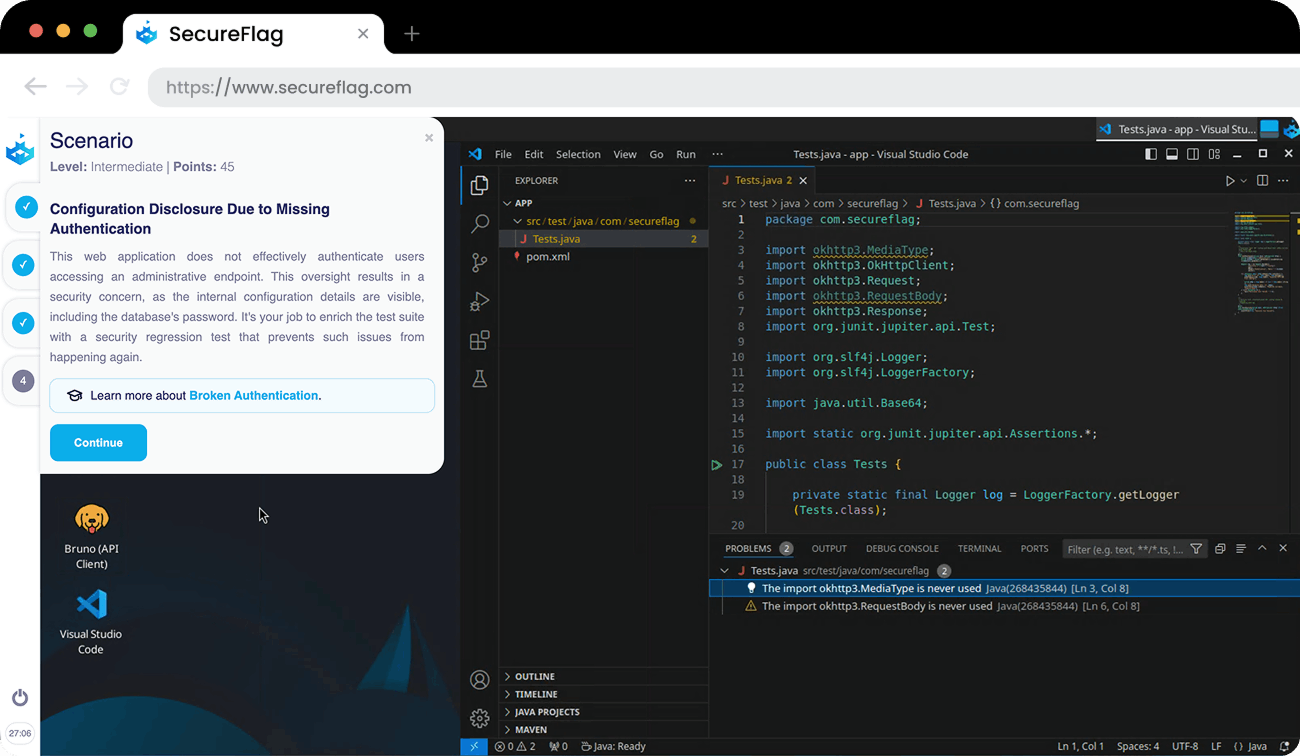
Our interactive QA training labs already help engineers practice writing regression tests for security vulnerabilities using tools and languages like Postman, Selenium, and Python. Now, the labs also include Java-based security testing scenarios.
The new Java labs offer practical challenges focused on:
-
Regression testing for critical issues, including file traversal, NoSQL injection, missing authentication, and privilege escalation.
-
Automated testing with Selenium, including checks for improper origin detection and UI-based security gaps.
These labs mimic the types of vulnerabilities QA teams are likely to encounter in the real world, giving engineers the opportunity to design automated tests that catch issues early and prevent them from coming back.
If your team works in Python, Java, or a combination of both, SecureFlag’s QA labs offer a safe, practical way to enhance security testing skills alongside existing functional testing workflows.
SecureFlag Helps QA Strengthen Secure Software
We know that QA teams play a critical role in keeping software secure, not just by catching issues, but by helping prevent them from resurfacing.
Integrating these security tests into everyday workflows allows QA teams to catch vulnerabilities early and strengthen overall product security. The result is QA teams testing whether features work and are safe from attack.