
Part of the AI-Assisted Development Labs series
These days, AI coding assistants are no longer limited to generating code on request. Many teams are now extending them with agents, custom skills, and integrations to automate repetitive or complex development tasks.
It’s great for productivity, but when AI assistants are given more autonomy or access to external tools, the potential for mistakes or misuse increases. SecureFlag’s new AI-Assisted Development Labs help developers safely use these extensions.
The Move Toward Automation
There’s an important difference between asking an AI assistant to help with a task and giving it the ability to act autonomously. When a developer prompts an AI to generate a function, they review the output before anything happens.
However, when an agent is running, it can read files, execute commands, call external services, and make changes, often across multiple steps, without a human in the loop at every stage.
Actions are no longer confined to a single prompt; they can span multiple systems and decisions without direct input at each step. An agent with access to a database, an API, or the file system is taking actions that can have serious consequences, including for security.
What are Agents, Skills, and MCP Integrations?
Before getting into the security implications, it’s worth clarifying what these terms mean.
Agents
Agents are AI assistants that have been set up to work autonomously, such as reading files, running commands, calling external tools, and completing multi-step tasks with minimal human intervention.
Tools like Claude Code and Codex are examples of agents, designed to actively assist in building, debugging, and managing software rather than just responding to prompts.
Such tools can use subagents, which are smaller, focused components that handle specific concerns, and run them in parallel. Each subagent is given only the context it needs to complete its part of the task, so they tend to be more lightweight and targeted. Examples include credential scanning, dependency auditing, and threat modeling.
Skills
Skills are reusable, named instructions that can be called with a single command. Rather than writing the same prompt from scratch every time, a skill groups a set of instructions into a repeatable workflow.
Model Context Protocol (MCP)
MCP integrations connect agents to external systems. For example, an agent can run a scanner or query a database and work with the results without a developer acting as the go-between.
Where Security Risks Appear
As AI assistants become more embedded in development processes, the risks change. This is also seen in frameworks such as the OWASP Top 10 for Agentic Applications.
These are some of the most important risks to watch out for:
-
Indirect prompt injection: Malicious instructions in external content can influence an agent’s behavior. Seeing as assistants can’t clearly distinguish between instructions and data, harmful input can lead to unexpected or unsafe actions.
-
Untrusted inputs: External sources such as APIs, documentation, or web pages could have incomplete or misleading information, and if there’s no validation, it can lead to incorrect or unsafe behavior.
-
Over-permissioned actions: Agents or integrations could get access to files or systems they don’t really need, increasing the impact of mistakes.
-
External integrations: Third-party skills or MCP servers can take actions inside the agent’s session without the developer being aware of it.
-
Automation without oversight: Tasks executed automatically can introduce changes without proper review, making issues harder to catch early.
Building Secure Extensions
Most of the risk in agentic AI development comes from extensions that haven’t been properly evaluated. Approaching every third-party extension as untrusted until reviewed is essential, as a downloaded skill, a community MCP server, or an instruction file can all perform actions within the agent’s session.
Each MCP server effectively becomes part of the execution flow. If it’s malicious or compromised, it can act within the agent’s session, so every integration should be properly evaluated before being enabled.
To use these extensions safely, developers need to:
-
Set secure instructions: Ensure reusable skills include security requirements as well as functional ones. Things like enforcing input validation rules, performing authentication checks, or using safe defaults so that insecure patterns aren’t automatically repeated.
-
Limit access and permissions: Give agents only the access they need to perform their tasks. For example, restrict access to specific directories, APIs, or tools rather than allowing broad access across the environment.
-
Validate inputs and outputs: Make sure that external data and tool responses are safe to act on before the assistant uses them in automated tasks.
-
Test extensions before use: Validate skills, agents, and integrations in a controlled environment before using them in workflows. Doing this helps to catch unexpected behavior or edge cases before they get to production systems.
-
Maintain human checkpoints: Keep human review steps in place when tasks are automated. It’s important to still check the changes made by agents, such as pull request reviews or approval workflows.
-
Separate analysis from action: Use read-only or planning modes where possible so the assistant can explore and reason about a task before making changes.
-
Log and audit agent activity: Record actions taken by agents, including what was executed and why. It makes it easier to detect unexpected behavior, investigate issues, and demonstrate compliance.
-
Keep extensions up to date: Regularly review and update third-party skills and MCP integrations. As with any dependency, outdated or unmaintained extensions can introduce new risks in the long run.
Examples from the Labs
The SecureFlag labs reflect how teams are already extending AI assistants in real development environments. For example, some scenarios include:
-
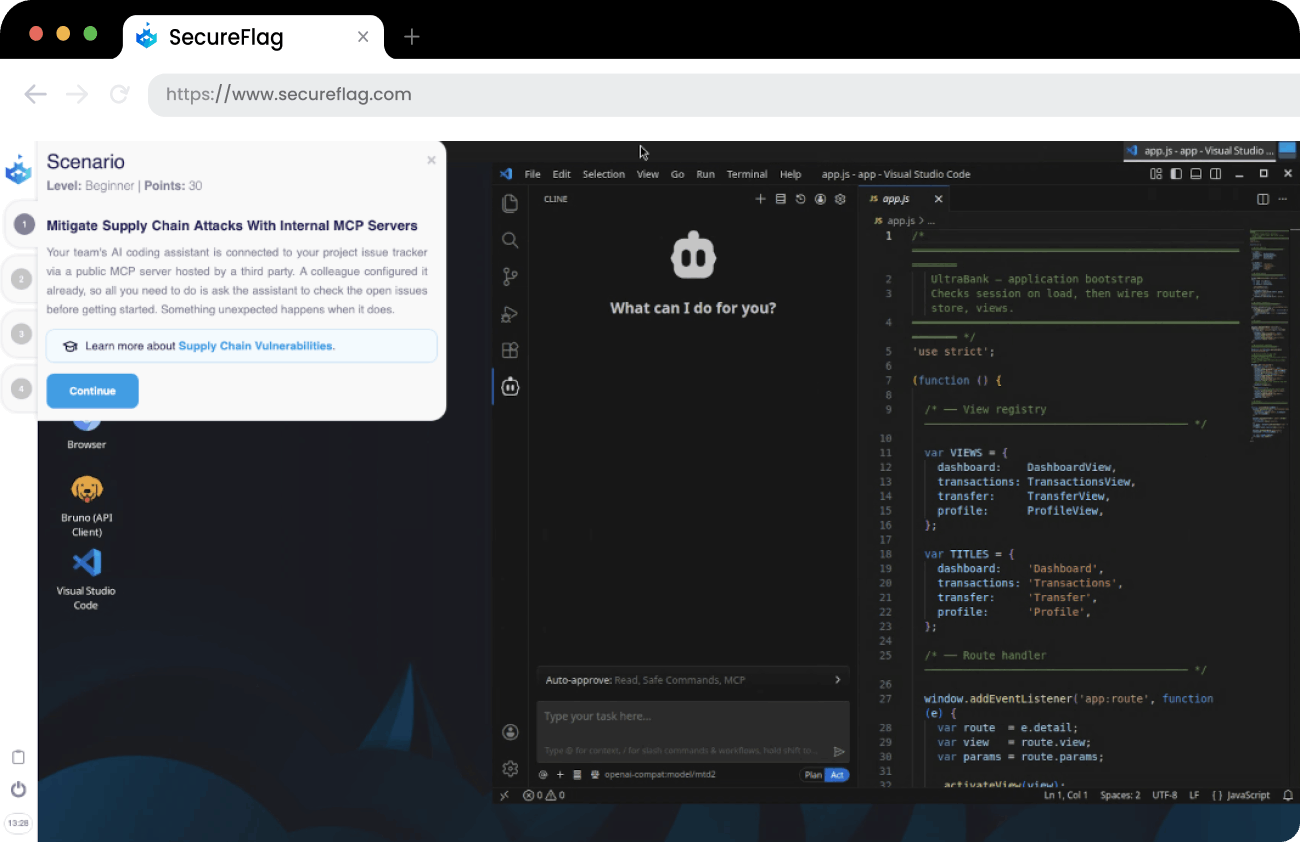
Mitigate supply chain risks when using MCP integrations by working with trusted internal servers and controlling external dependencies.
-
Create a reusable AI-assisted skill to fix SAST findings, ensuring vulnerabilities are resolved consistently and correctly.
-
Prevent malicious command execution through untrusted skills by understanding how external instructions can be abused within an agent’s session.
These labs are designed to help developers understand how to build these extensions without increasing risk.
Training Teams to Build Secure AI Automations
Extending AI assistants is becoming part of everyday development, but the challenge is making sure it’s done safely. SecureFlag is leading the way in training developers to do just that.
SecureFlag’s AI-Assisted Development Labs give developers hands-on experience creating and using skills, agents, and integrations in a controlled environment. They learn how to automate tasks while maintaining secure development practices, rather than introducing new vulnerabilities.
The teams that build these skills now won’t have to play catch-up as agentic development becomes the norm.
Ready to see the labs in action?