Part 1 of the SecureFlag AI training series
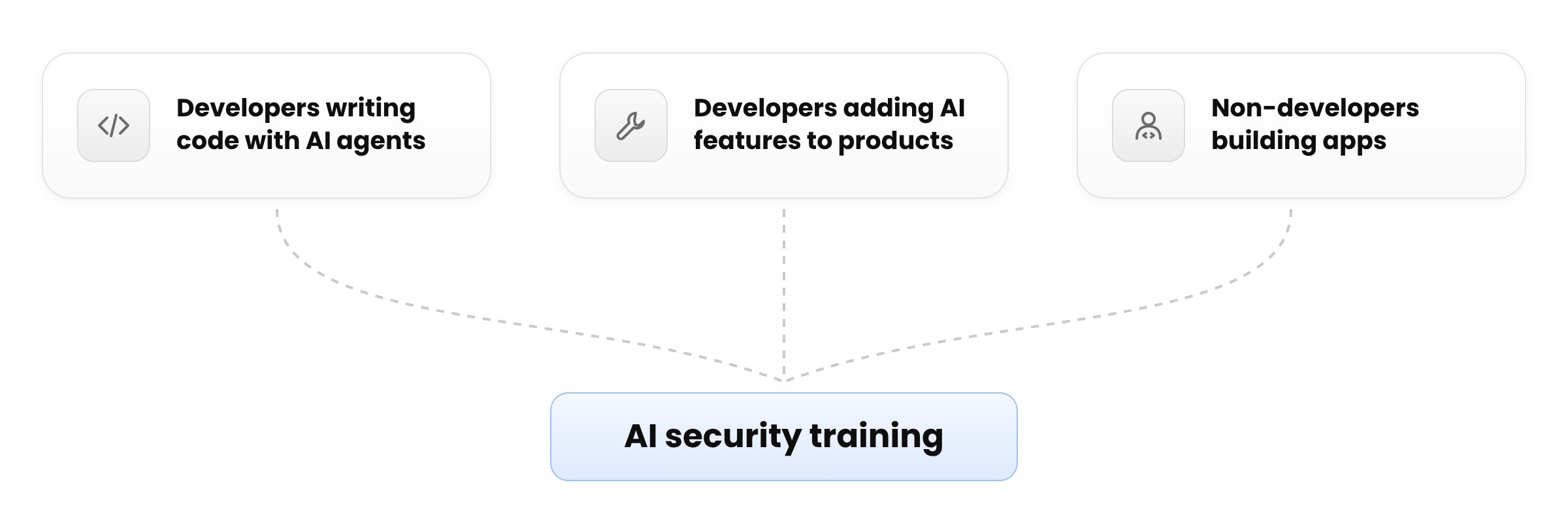
AI secure coding training should differ based on how teams use AI to build software. Developers who use AI coding agents to implement features have different learning needs than those integrating an LLM into a product. And neither is in quite the same position as an employee building an internal application with a no-code tool.
The challenge for organizations is working out which skills each group needs and how they fit together. Secure coding remains fundamental for developers, but it needs to be supplemented with more specialized training depending on the work they do.
How AI changes the developer’s job
AI coding assistants such as Cursor and Claude Code have changed how developers spend their day. Instead of writing most of the code themselves, developers describe what they need and review what the assistant produces. One instruction can change many files, so a developer may have to review a large amount of new code at once.
Assistants usually don’t warn when their code has a security flaw, and flawed code can look the same as correct code. A feature can work as expected and pass its tests while still missing an authorization check or exposing sensitive information. Developers are therefore responsible for finding problems in code they did not write and may not read line by line.
Matching training to the work people do
Three groups are described below, based on the work each one does with AI.
Developers using AI coding agents
Developers who use AI coding assistants need to know how to prompt for secure code and review the results for missing security controls and vulnerabilities that might not show during normal testing. They also have to confirm that any fixes work.
The main risk is that code returned by an AI coding agent gets released without anyone checking it, so the focus is on making secure coding and code review part of AI-assisted development.
Developers building AI-driven products
Teams that add large language models (LLMs) and other AI services to their products face additional risk, because each AI feature can expand the application’s attack surface.
These include prompt injection, where carefully crafted input can manipulate a model’s behavior, and sensitive information ending up in prompts or logs. AI features may also have access to tools or systems they don’t need.
Developers should understand how these security risks arise and how to limit what AI components can access or do.
People building apps outside engineering
Employees in finance, sales, HR, and other business teams can now use low-code, no-code, and AI tools to build applications without traditional software development skills. Called citizen developers, they can create useful tools for their teams but may not understand the security risks involved.
For instance, an application could give others access to data they shouldn’t see or expose sensitive information through a connector that hasn’t been configured properly. Training can help citizen developers find these risks and make safer choices when building applications.
Why secure coding fundamentals come first
Before any AI-specific training, developers need practical experience finding vulnerabilities and fixing code themselves, since someone who cannot catch a flaw in their own work will have a hard time finding one in code written by an AI coding assistant.
Developers need to understand how different types of vulnerabilities work, how to catch them in code, and which fixes are available for each. Vulnerabilities can often be mitigated in several ways, so they need to know their options in enough detail to choose the fix that fits their language and framework.
Hands-on practice builds this understanding because reading about a vulnerability explains what it is, while finding it in code and mitigating it gives developers experience they can apply to their own work. It also helps them evaluate AI-generated fixes instead of accepting the first suggestion that seems to work.
This foundation supports other areas of AI security training. Developers start with secure coding and then add training that matches their work, while citizen developers take guided labs that need no scripting and cover risks such as prompt injection and unsafe connectors.
Putting training in place
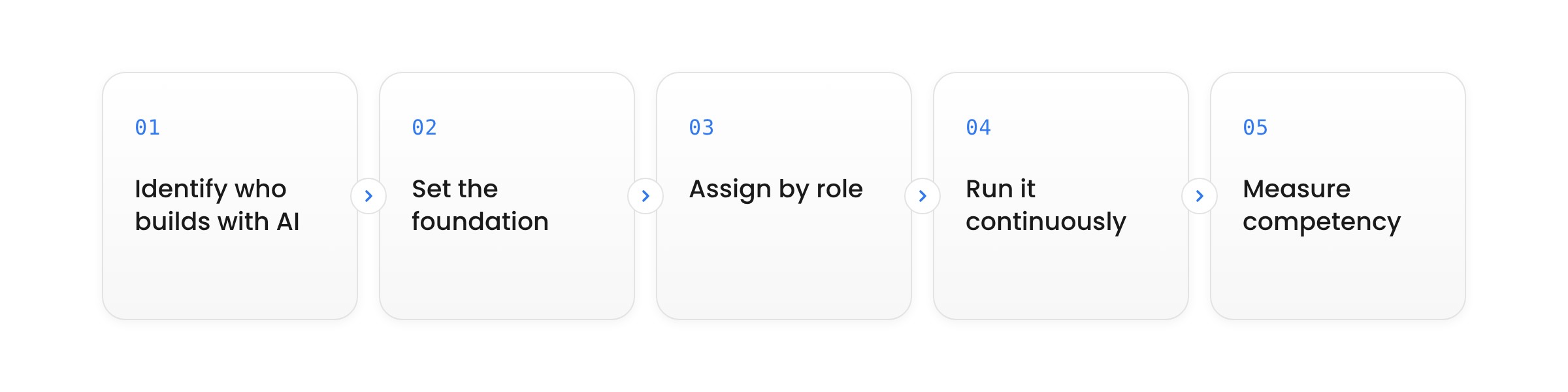
A rollout works best in five steps.
-
Identify who builds software with AI: Find out who writes code with AI tools, who builds AI features, and which citizen developers build applications outside engineering. Organizations get a clearer picture of the risks employees face and the training they need.
-
Set the foundation: Assign foundational secure coding training to developers first, since the rest of their training depends on it.
-
Assign by role: Give each person the training that matches what they do with AI. People who do more than one of these activities take the training for each.
-
Run it continuously: Keep training ongoing throughout the year. Annual plans and adaptive learning help developers stay up to date, and just-in-time labs bring training directly into their everyday work.
-
Measure competency: Use more than course completion metrics to assess what people have learned. Tracking coverage and competency by technology shows where more training is needed, while linking training records to code commits can show the skills behind delivered code.
How SecureFlag supports AI security training
SecureFlag provides hands-on labs in over 70 programming languages and frameworks, where developers find and fix vulnerabilities in realistic environments. Every developer starts with this training, and the rest builds on it.
For AI, SecureFlag provides a range of training and tools, including the following:
-
Agentic Coding Labs: Developers practice asking AI coding assistants for secure code, reviewing the output, fixing flaws, and integrating with MCP.
-
OWASP AI-specific labs: These cover the OWASP Top 10 for LLM Applications, Agentic Applications, and Agentic Skills, along with the OWASP MCP Top 10.
-
AI Agent Security for Citizen Developers: This practical course uses guided labs that need no scripting.
-
ThreatCanvas risk templates: SecureFlag’s threat modeling tool includes templates for the OWASP Top 10 for LLMs and Agentic Applications.
-
SecureFlag MCP Server: The MCP Server connects AI coding assistants such as Claude Code and Codex to SecureFlag’s labs and threat modeling.
Annual plans and adaptive training keep learning continuous, and coverage and competency tracking show how each person is progressing.
Starting with foundational secure coding and adding role-based training prepares developers to review code from AI tools and helps everyone else who builds with AI protect company data.