Part 2 of the security requirements series
A large part of the appeal of AI coding assistants is that they can turn a short request into a working feature within seconds. However, because they build only what the request describes, security controls that were never mentioned do not appear in the result, and the output often gives no sign that anything is missing.
This is the second post in a three-part series about security requirements. The first post followed a password reset ticket that left out the protections the feature needs, and this post gives the same story to an AI coding assistant.
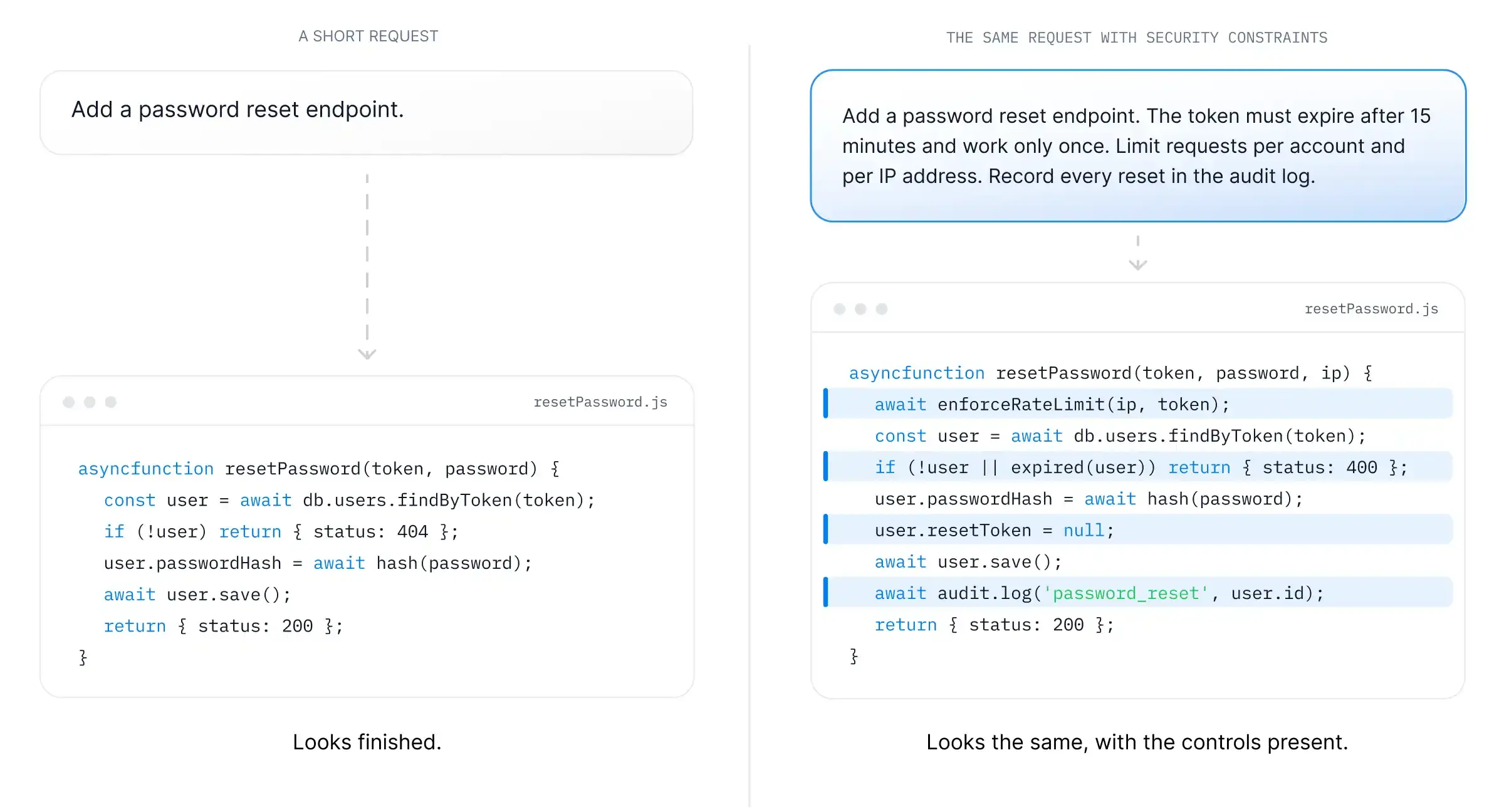
What the assistant produces from a one-line request
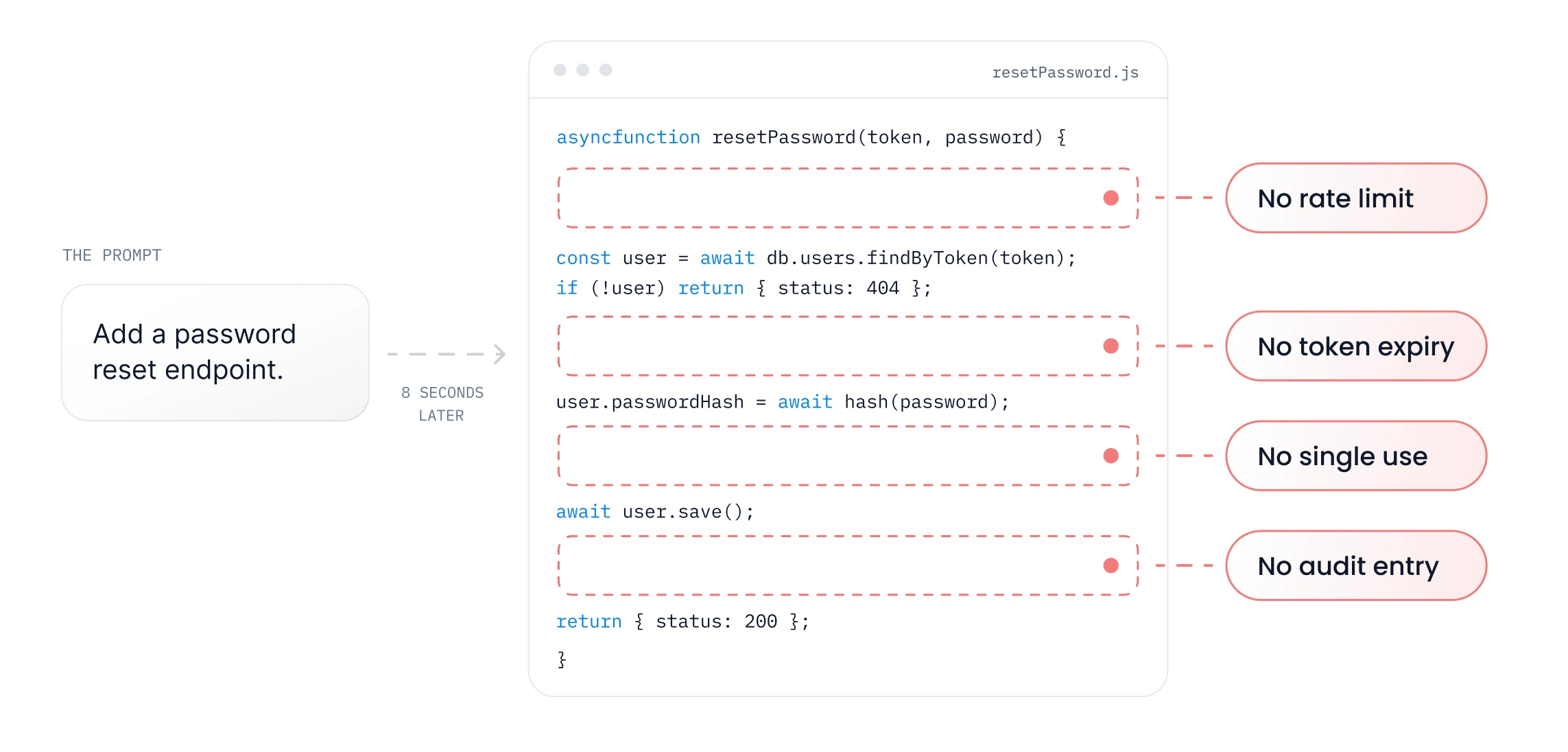
A developer working with an AI coding assistant types a short request.
Add a password reset endpoint.
A few seconds later, a function appears. It looks up the user by reset token, hashes the new password, saves it, and returns a success response. The code is clean, follows common conventions, and is structured correctly, so it would likely pass many code reviews without comment.
In this example, the function doesn’t have any of the following:
-
A token expiry.
-
Invalidation of the token after a single use.
-
A limit on how many reset requests can be made.
-
An audit entry that records the reset.
The audit entry is another control the ticket never had, giving an organization something to investigate if an account is later compromised.
The request didn’t ask for these controls, so the model had no reason to include them.
Models build the specification they are given
An AI coding assistant produces what the prompt describes and little else. It has no view of the organization’s threat model or regulatory obligations, and it does not reason about the business logic of the feature unless those details are provided. It is also unlikely to invent a control that was not requested, and it generally will not mention leaving one out.
The code can arrive without any comment about rate limiting or any note about invalidating sessions, which leaves it looking finished to anyone who reads it.
Without a written requirement, a developer may still add the control from personal knowledge, though that depends on their skills. An assistant has less information to work from unless the prompt includes it, so the omission can end up in the code within seconds.
The prompt is the specification
In AI-assisted development, the prompt works as the specification. Whatever it includes gets built, and whatever it leaves out generally doesn’t make it into the output. Most teams are probably still adjusting to this idea.
As a result, two developers can get very different code from the same coding assistant. For example, a developer who understands security is likely to know what to include in the prompt for a password reset feature, such as token expiry and rate limiting. The prompt might read as follows.
Add a password reset endpoint. Reset tokens must be random and single-use, and they must expire after 15 minutes. Return the same response whether or not the email address has an account. Limit reset requests per account and per IP address. End all active sessions after the password changes, and write an audit log entry for every reset.
A developer without that knowledge is more likely to ask the assistant to make the feature work and to release whatever comes back.
Even if both developers use the same assistant and model, the code differs because of what was asked for. Writing prompts that include security constraints is becoming a security skill, and should be taught in the same way as others, through practice in realistic labs.
Code that looks finished can still be incomplete
Flaws are common in human-written code too, although insecure AI output may be easier to trust as it often looks complete. The code compiles and the tests pass because they check only what the ticket described, which in this case is a person resetting a password successfully.
Most of what the code contains is correct, but the problem is what it leaves out, which is easy to overlook when a reviewer is short on time. A reviewer is likely to notice a missing control only if they already know it should be there, and with AI-generated code, they may have more changes to check in the same amount of time.
How to review AI-generated code for missing controls
Reviewing for missing controls differs from reviewing for errors, as there may be nothing visibly wrong in the code. These practices give the reviewer something to check against.
-
Define the requirements first: Before looking at the code changes, list the security requirements for the feature, so the reviewer can tell which controls are missing.
-
Match each requirement to a line of code: If there’s no matching line for a requirement, it’s a finding, even if everything else looks correct.
-
Test both expected use and misuse: For password reset, that could include using a token after it should have expired or sending many reset requests in a row.
-
Read the prompt along with the code change: The prompt makes it easier to tell whether a missing control was left out of the request or the code.
From one endpoint to hundreds of stories
So far, this has been about one endpoint, where two engineers could discuss the missing controls and resolve it. However, when hundreds of stories ship in a quarter, engineers may not be able to discuss the requirements for each one, so the final post in this series looks at how to manage it.
Supporting secure software development
SecureFlag helps organizations improve application security by giving developers the expertise and practical skills to build more secure software. Its hands-on training includes labs for the OWASP Top 10, including LLM risks, agentic AI, and MCP, as well as Agentic Coding Labs for developers who work with AI coding assistants.
The platform also offers automated threat modeling with ThreatCanvas and integrations that bring security into everyday engineering workflows.