Teams generally agree that threat modeling is valuable, but they usually do it separately from the development lifecycle. It might be a workshop or a tool someone has to remember to open, and in either case, the model can quickly become out of date.
Over the last year, SecureFlag has listened to what got in the way for our customers. Today we are releasing ThreatCanvas 3.0, a complete redesign of the user experience with one goal: to make threat modeling a natural step in how software gets built.
The release includes a rebuilt interface with more flexible diagramming and a much smarter assistant.
A completely new interface
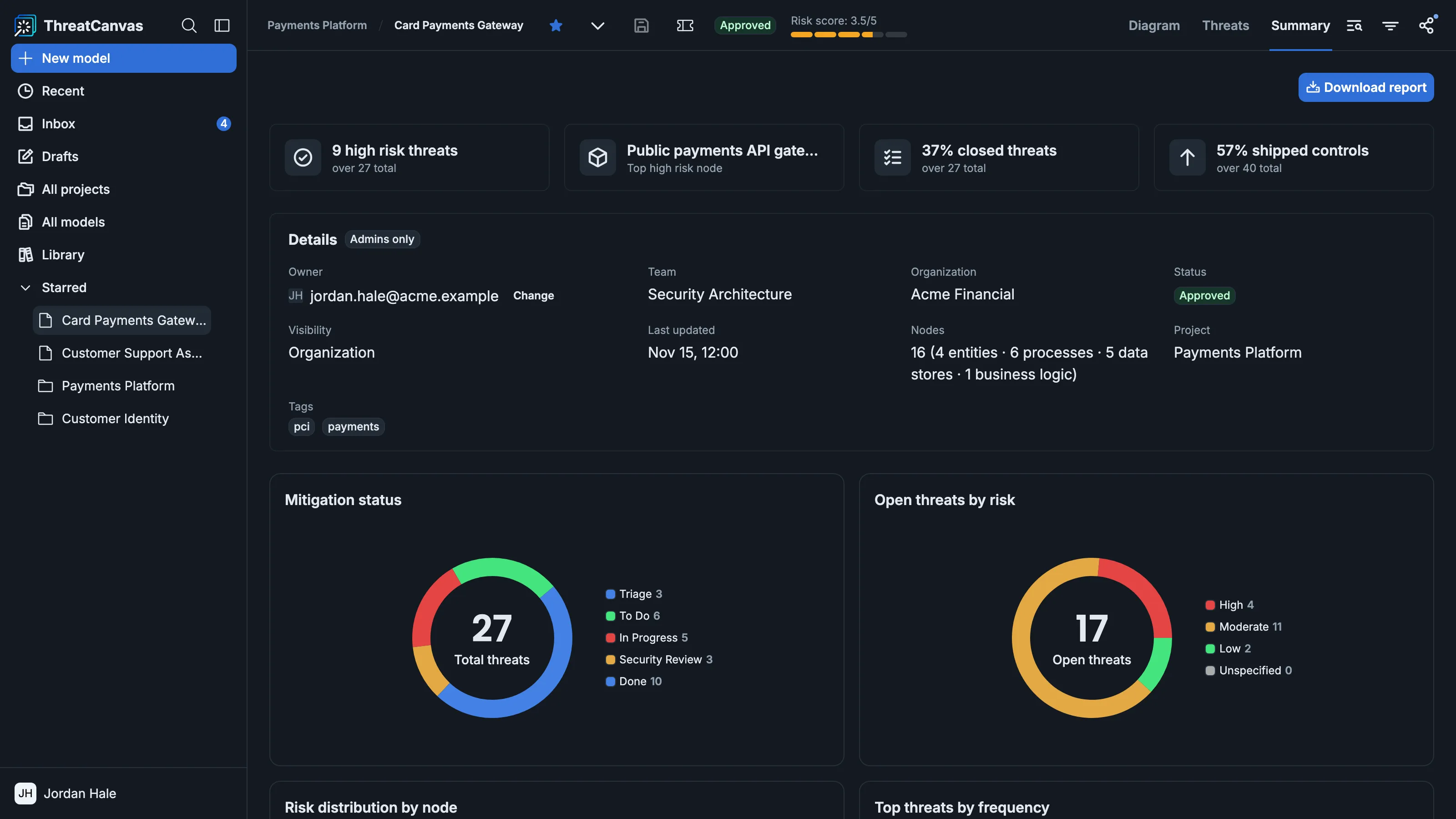
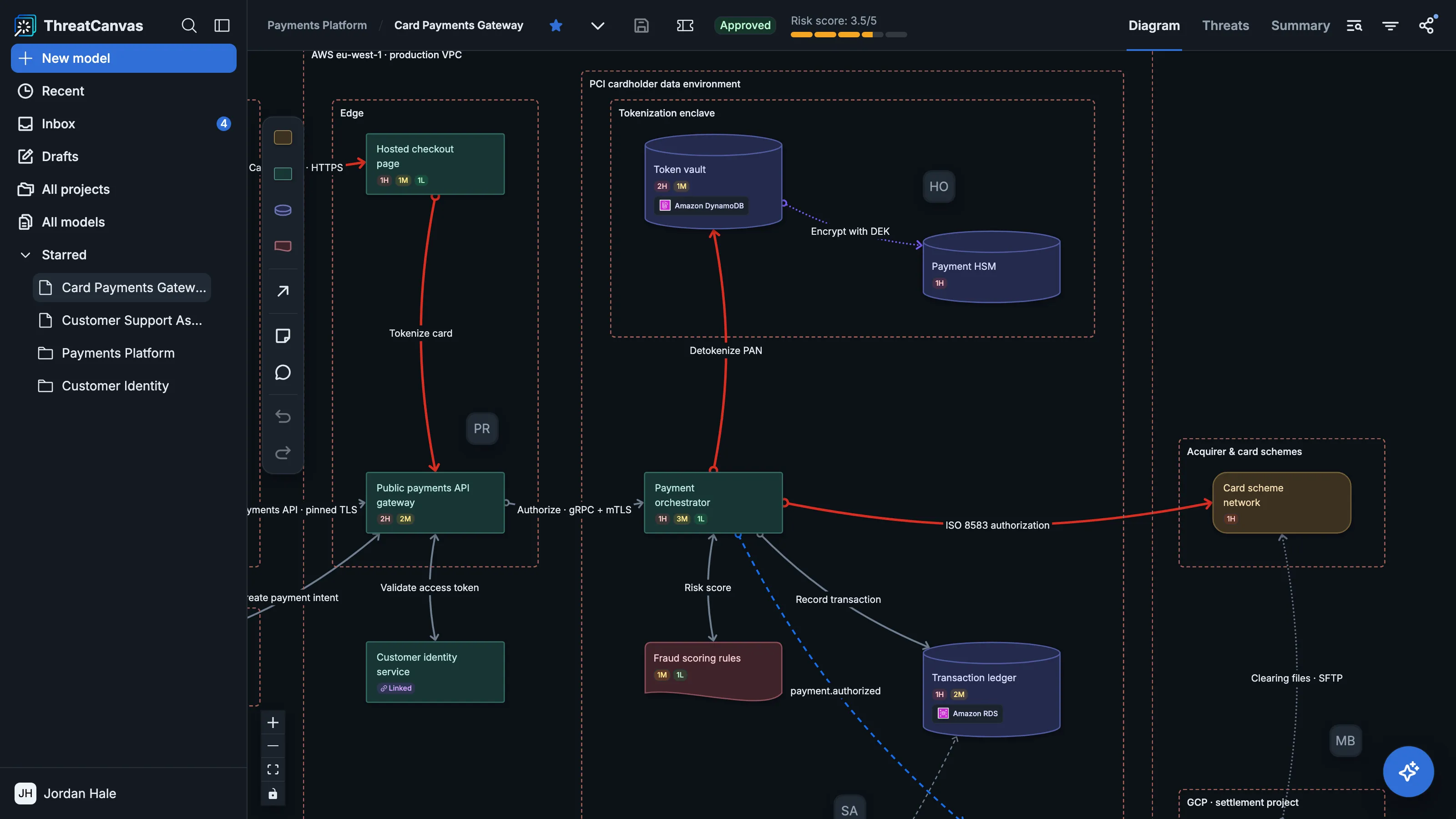
Every screen has been rebuilt. Choosing components and applying threats and controls is faster and more direct, and the information a user needs is placed where they would expect it, without extra clicks.
Navigation received the same attention. Moving between models and projects, including recent and starred items, is immediate. Fast navigation is especially useful for teams with dozens of models across multiple projects, since locating the right one can take up most of their time.
Diagramming that keeps up with real systems
Real architectures are often complex, and the previous diagramming couldn’t always represent them. ThreatCanvas 3.0 introduces several improvements.
-
Components are recognized automatically, and each node displays an icon that reflects what it represents, making diagrams easy to read quickly.
-
Connections between components are more flexible. Users can choose dotted or solid lines, adjust their weight and color, and add multiple connections between the same two nodes. It’s easier to show different interactions between the same services.
-
Trust boundaries can now be nested. For example, a team can represent a VPC inside an account, a container inside a cluster, or a tenant inside a region.
-
Sticky notes let users leave context directly on the canvas, such as an open question or a decision that still needs to be made.
An assistant that asks better questions
The ThreatCanvas assistant is considerably more capable. It understands system descriptions with more nuance, and it now asks questions when something is ambiguous.
This is an important change because an assistant that fills in missing details on its own can produce a model that looks complete but contains subtle errors. When the assistant asks a question such as “Is this service handling payment data, or just passing it through?”, the person who knows the answer resolves the ambiguity, which makes the resulting model more trustworthy.
Threat review, reworked
After a model is built, teams still have to review the threats it produces, and that step needed better support.
Users can now view threats as a list or a Kanban board. Each threat includes a preview of the node it relates to, so reviewers can see which component is involved without leaving the review screen. Teams can choose the view that best suits their workflow.
Comments and mentions let team members discuss threats directly in the model. They can tag the person responsible for a service to ask a question or get their input.
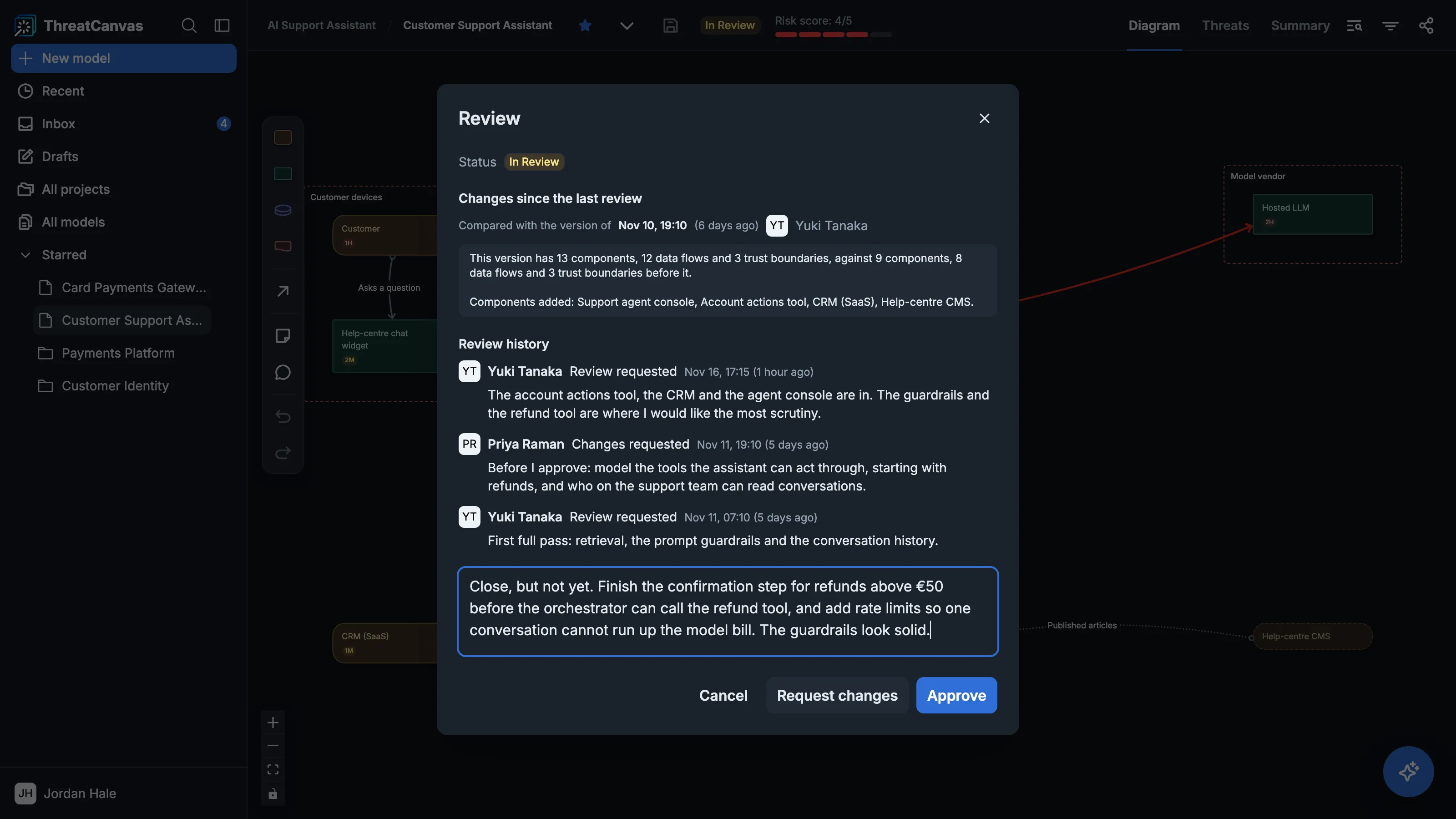
A review workflow lets authors request a review, and reviewers approve the model or send it back with changes. It helps teams document reviews and record who approved a threat model, which is useful when they need to show the review process is complete.
Libraries and fields for internal standards
ThreatCanvas includes built-in libraries of threats and controls, which provide a starting point for many teams. However, organizations often have their own security standards and architectural patterns, as well as knowledge about the risks in their systems. ThreatCanvas allows them to capture this information and use it in their threat models.
Managing custom libraries
The new Library section in the sidebar gives organizations a central place to manage their custom threat modeling content. It includes four tabs:
-
Threats: Each threat can include a risk level and description, along with its mitigating controls.
-
Controls: Organizations can define their own controls.
-
Components: Reusable diagram elements saved with their own descriptions and associated threats and controls.
-
Risk templates: Groups of threats and controls for use in specific projects.
Risk templates can be associated with specific projects, so a payments project can be assessed against the organization’s payment standards, while an internal tool is assessed only against the requirements that apply to it. The “Show usages” option for a component lists the models that use it.
Changes to Library entries do not update existing models, which keep their own copies of the content. Changes are applied to a model only when the updated entry is selected again.
Custom fields for architecture components
Custom fields extend this to the nodes themselves. Organizations can define additional properties, such as data classification or system ownership, and record them directly in the architecture diagram.
Threat modeling from AI coding tools
ThreatCanvas offers full support for the Model Context Protocol (MCP) through the SecureFlag MCP Server, allowing developers to use its threat modeling capabilities directly from AI coding tools such as Claude Code and Codex.
Developers can ask their AI assistant to generate threat models for an entire project or a specific feature, drawing on the application’s codebase or on existing design information. When code is used, only the architectural description derived by the assistant is sent to SecureFlag, not the source code.
For existing threat models, developers can ask the assistant to review architectural changes and update the model incrementally, preserving the risk assessments already made. They can also ask questions about the threats and controls in a model.
Coming in December: Sandbox
Sandbox provides a separate workspace where users can try an approach or restructure a diagram, then merge changes into the main canvas when they’re satisfied. The model the team is working from is not affected until the changes are merged.
Getting started with ThreatCanvas 3.0
ThreatCanvas 3.0 is available now.
Existing customers will find it already in place when they log in.
Not a ThreatCanvas customer yet? See how it can generate a threat model from one of your own stories in a few seconds. Book a demo.