Part 4 of the SecureFlag AI training series
Everyday employees, such as those in finance or sales, can now build their own apps to save time and share them with their team or company. These builders are known as citizen developers, and they work outside engineering, using low-code, no-code, and AI tools. They understand the business process, but may not know how to keep an app secure.
Example: Building a tracker
The easiest way to explain how security issues might affect citizen developer apps is with an example, in this case, an app built by a customer success team. The team builds a renewal tracker with help from an AI assistant. The tracker pulls account data from the company’s customer relationship management (CRM) system and shows each customer’s renewal date.
It works well, so the team shares it with the rest of the company. A few weeks later, someone in another department opens it and sees sensitive information such as contract values, contact details, and support history for every customer. The team shared it to be helpful but didn’t think about who should be able to see the data.
Who should get access to the app?
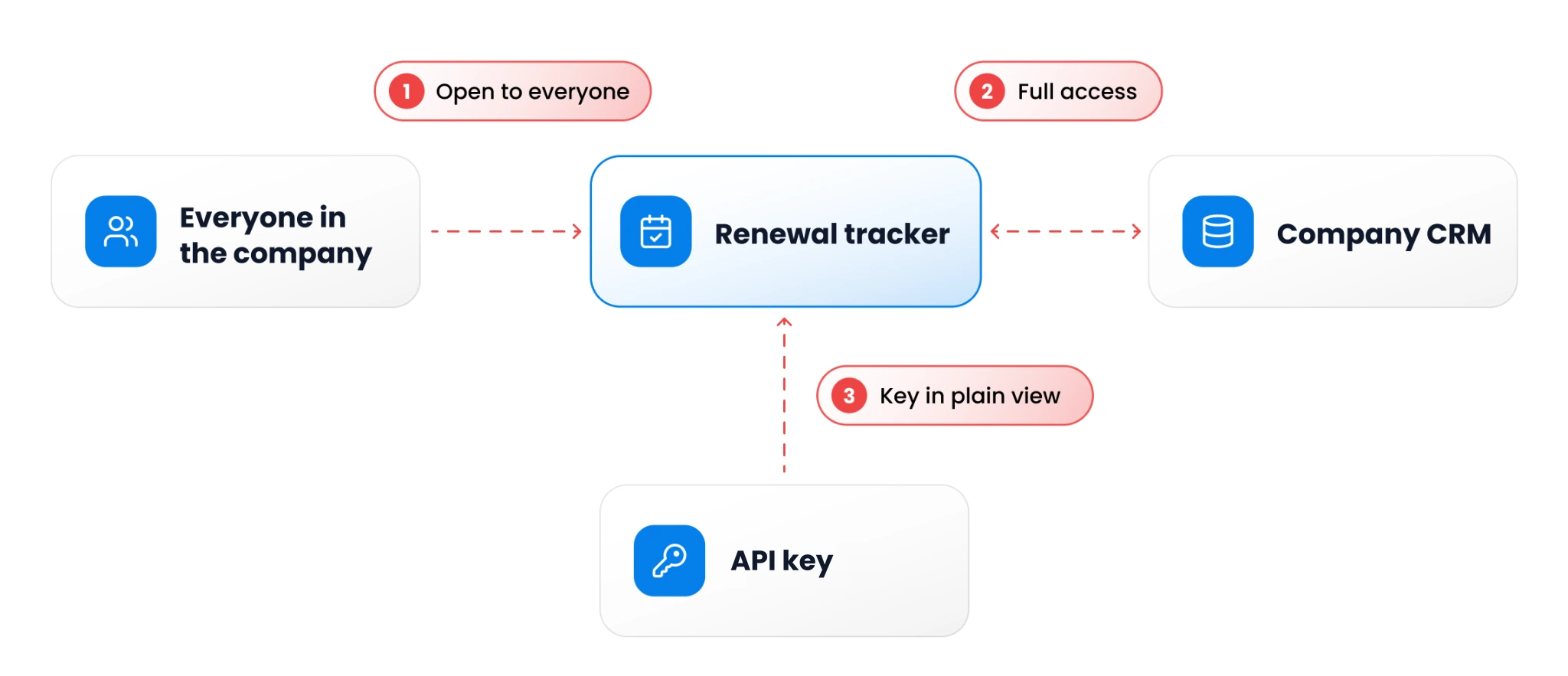
When sharing the app, the team chose the option for everyone in the company because it was the quickest option. The problem is that the app is configured to display every CRM field, including fields the team doesn’t use, so anyone who opens it sees all that data.
That’s why access to apps should be limited to those who need them, with each user seeing only the information relevant to their role. In this instance, the tracker needs to show renewal dates, without making other data visible.
What permissions should the app have?
To read account data, the tracker uses a connector to the CRM. When the builder connected the tracker to the CRM, the setup screen asked for access to all account data. It was the fastest way to get the app working, so the builder approved it.
Now the tracker can do more than the team intended. It can change records, read data from other teams, and delete entries, even though the tracker only needs to display renewal dates. If the app is misused or the account behind it is compromised, those permissions could also be abused.
The safer choice is to give a connector only the access the app needs. A tracker that only displays renewal dates should have read-only access to the account fields it shows.
Where should the API key be stored?
The connector needed an API key, which works like a password that lets the app sign in to the CRM. The first attempt failed, so the builder pasted the key into the app’s settings, and later into an AI assistant’s chat to ask for help fixing the error. The app worked after that.
However, anyone who can access the settings or chat history may be able to retrieve it and use it to access the CRM with the permissions assigned to it. An API key like this should never be exposed in app settings, scripts, or AI prompts.
Store the key in a secure secrets manager or the platform’s built-in credential storage, and make sure only those who need it can access it. If the key has already been shared in an app setting or AI chat, it’s essential to revoke it and create a new one.
Everything functions, but is it safe?
Before sharing the tracker, the citizen developer tested it to make sure everything worked as intended. The renewal dates were correct, notes could be saved, and all the screens loaded.
The problem is that the builder tested whether the app worked, but not what it allows. AI-generated components can introduce the same security issues as manually written code. They may work as intended while still missing safeguards, and functional testing won’t necessarily reveal those problems.
This is particularly relevant to apps generated through vibe-coding, where the builder describes the app in plain language and an AI tool writes it, so the builder may never read what it produced.
When does an app need a security review?
Not every app needs a security review. A personal checklist or reminder, for example, is unlikely to need one. However, a review becomes important when an app:
-
Uses real customer, employee, or financial data.
-
Is shared outside the builder’s own team or company.
-
Connects to a central system such as the CRM, finance tools, or HR records.
-
Uses a key, password, or other credential.
The renewal tracker met these criteria, and a security review could have identified the problems before the app was shared more widely.
Security training for citizen developers
SecureFlag provides hands-on security training for teams involved in software development, including those building applications outside engineering. Learners work in realistic lab environments, covering over 75 technologies.
For citizen developers, the labs are guided and provide step-by-step instructions through a graphical interface, so there’s no need for scripting or command-line experience. They cover data exposure and oversharing, permissions, connectors, and credential management.
Teams learn to identify security risks in the apps they build, make safer configuration choices, and know when to request a security review.