
Teams using threat modeling tools need more than a list of potential threats. Developers need to understand which findings apply to their design and what to do about them, while security teams need a way to review and track models.
The seven tools below range from free open-source projects to enterprise platforms, and the right one depends mostly on how a team builds software and who is expected to use the models.
Types of threat modeling tools
The Threat Modeling Manifesto defines threat modeling as “analyzing representations of a system to highlight concerns about security and privacy characteristics.” Put simply, it’s the practice of asking what could go wrong with a design before attackers find out for you.
A threat modeling tool turns that practice into a repeatable process. Most tools add four capabilities: diagramming the system, generating likely threats, rating and tracking risk, and producing a shareable report.
Not every tool works the same way, so it helps to group them by how they build the model:
-
Diagram-based tools start from a visual data flow diagram that a team draws.
-
Model-as-code tools define the system in code or config, so the model lives in version control.
-
Automated platforms generate models from sources such as text, diagrams, code, or infrastructure templates, often with AI assistance.
It’s also worth checking which threat modeling methods a tool supports. Tools that map their threat libraries to established methods such as STRIDE and LINDDUN make it easier to align findings with the approaches a team already uses.
The case for threat modeling
OWASP lists Insecure Design as A06:2025 in its latest Top 10 and calls for greater use of threat modeling. NIST’s Secure Software Development Framework also recommends “forms of risk modeling,” including threat modeling.
Fixing a design flaw before any code exists is generally less expensive than fixing it after release, and vulnerabilities that reach production can be expensive, with the average U.S. data breach costing a record $11.5 million in IBM’s 2026 report.
The best threat modeling tools
The tools fall into two groups: free open-source projects and paid enterprise platforms. Below are seven established options, each with a short “best for” summary, followed by notes on methodology and cost and on how it fits a developer workflow.
Open-source and free tools
OWASP Threat Dragon
Ideal for teams wanting a free, cross-platform starting point.
Threat Dragon is an open-source OWASP threat modeling tool available as both a web app and desktop app. It supports methods including STRIDE and LINDDUN, and can automatically suggest potential threats based on your architecture diagram.
Teams that later need more automation or collaboration can import their Threat Dragon models into ThreatCanvas instead of rebuilding their diagrams, although some manual review may be needed after the import.
Microsoft Threat Modeling Tool
A good fit for Microsoft- and Azure-centric teams.
Microsoft Threat Modeling Tool is a free Windows desktop tool that uses data flow diagrams to support STRIDE-based threat modeling. It is part of Microsoft’s Security Development Lifecycle. Its main limitations are that it runs only on Windows and updates are relatively infrequent, but it can be a practical option for teams already using the Microsoft stack.
OWASP pytm
Best for developer-centric teams that prefer “threat modeling as code.”
pytm is an open-source Python framework where the threat model is defined directly in Python code. From that definition, it generates data flow diagrams, sequence diagrams, and reports. As the model lives in code, it works well with engineering practices such as code review and version control.
Threagile
Suited to DevSecOps teams that want models in the code repository.
Threagile is an open-source threat modeling tool that lets teams define their architecture in YAML and run analysis as part of CI/CD. It can generate reports in formats such as PDF, Excel, and JSON. Its graphical interface is still limited, so it is better for engineers who prefer working with code and configuration files rather than drawing diagrams.
Commercial and enterprise platforms
ThreatCanvas (SecureFlag)
Well suited to teams that want automated modeling tied to developer security training and remediation.
ThreatCanvas is SecureFlag’s automated threat modeling platform, generating threat models from text, diagrams, Infrastructure as Code, or code repositories. Its risk templates cover frameworks such as STRIDE, LINDDUN, and MITRE ATT\&CK. There are also templates for the OWASP Top 10 lists (including LLM and agentic AI), compliance standards such as PCI DSS, HIPAA, and FedRAMP, and cloud platforms, among others.
It runs from a graphical interface or through APIs and CI/CD pipelines, and it integrates natively with Jira and Azure DevOps. With the SecureFlag MCP Server, developers can generate threat models from within their IDE, and AI agents can do the same. Importantly, ThreatCanvas also links identified threats directly to developer training, giving teams a way to practice addressing the risks they find.
ThreatModeler (including IriusRisk)
Aimed at enterprises that want automated threat modeling.
ThreatModeler is an enterprise threat modeling platform with AI agents for system mapping, threat analysis, and reporting. It supports methods such as STRIDE, PASTA, and MAESTRO. It integrates with development tools such as Jira and Jenkins. ThreatModeler acquired IriusRisk in a deal announced in January 2026, and ThreatModeler Nexus now combines capabilities from both platforms.
Devici and SD Elements (Security Compass)
Suited to teams that want threat modeling tied to compliance requirements.
Security Compass offers two connected products. Devici is a diagram-first threat modeling platform with a maintained threat and mitigation library mapped to STRIDE, LINDDUN, and MAESTRO, and it has a free tier. SD Elements takes a requirements-driven approach, mapping the security controls a system needs to frameworks such as OWASP ASVS, NIST 800-53, PCI DSS, and HIPAA. The two can be used together, and Security Compass acquired Devici in June 2025.
Open source vs. commercial threat modeling tools
Free and paid tools differ in several ways that affect the choice. These are easiest to compare by looking at cost, automation, scale, governance, and maintenance effort. The table below shows the seven tools side by side.
| Tool | Approach | Cost model | Use case |
| OWASP Threat Dragon | Diagram-based | Free, open source (Apache 2.0) | Cross-platform starting point |
| Microsoft Threat Modeling Tool | Diagram-based | Free (Windows only) | Microsoft- and Azure-centric teams |
| OWASP pytm | Model as code (Python) | Free, open source | Developer-centric teams |
| Threagile | Model as code (YAML) | Free, open source (MIT) | DevSecOps pipelines |
| ThreatCanvas | Automated platform | Commercial, with Personal, Small Business, and Enterprise tiers | Automated modeling tied to developer remediation and training |
| ThreatModeler | Automated platform | Commercial | Enterprise automated threat modeling |
| Devici and SD Elements (Security Compass) | Diagram-based (Devici) and requirements-driven (SD Elements) | Commercial, with a free Devici tier | Teams tying threat modeling to compliance requirements |
Open-source tools offer flexibility without a license fee: They give teams more control over how the tool is used and maintained. The downside is that teams may need to handle more of the diagramming, updates, and maintenance themselves, with less vendor support when something breaks.
Commercial platforms tend to offer more automation and support: They often include prebuilt standards libraries, AI-assisted features, integrations with development tools, and vendor support. The main thing to consider is the subscription cost and, depending on the platform, the effort involved in getting started.
Maintenance is an easy cost to overlook. Free tools carry no license fee, but someone still has to manage upgrades and maintain rule sets, and models need to be kept current as systems change. Paid platforms generally include more of that maintenance in the subscription.
Team size can also help with the decision: Individual practitioners and small teams may find an open-source project such as OWASP Threat Dragon sufficient, while pytm and Threagile suit teams that prefer models in code. Larger and regulated organizations may need stronger governance and reporting at scale, which commercial platforms are generally better equipped to provide.
AI in threat modeling tools
AI appears in threat modeling tools in two main ways, and the first is using AI to help create the model. Several platforms can generate diagrams and potential threats from a text description or an existing artifact, saving time. However, these suggestions can include false positives or miss details specific to the design, so someone still needs to review the output.
Reviewability should be a central requirement, with developers able to inspect and edit findings and see which part of the design they relate to. It makes it easier to understand why a threat was identified and decide what to do about it.
The second is threat modeling applications that contain AI. Applications using large language models (LLMs) and autonomous agents introduce risks such as prompt injection and excessive agency that traditional threat categories may not cover.
Frameworks such as STRIDE still provide a useful starting point, but AI-specific categories can help teams identify risks associated with LLMs and agentic applications. The OWASP Top 10 lists for LLM and agentic applications cover many of these risks, with this guide to threat modeling AI systems showing how to apply them. A tool with templates for these risks lets teams apply the same threat modeling process to AI systems as they do to other applications.
How to choose the right threat modeling tool
Feature lists and demos tend to make every tool look good, so they don’t show which one fits a team. It helps to start with what threat modeling is meant to do, and then check how well each tool supports that.
Adam Shostack’s four-question framework is a well-known way to describe it. It asks what a team is working on, what can go wrong, what will be done about it, and whether the work was done well. The Threat Modeling Manifesto adds that the practice should be ongoing, valuing “continuous refinement over a single delivery.” A tool that only supports a one-time design review does not fit that approach.
These questions can help teams compare tools in a more practical way:
-
Methodology and compliance fit: Does it support the methods the team already uses, such as STRIDE or PASTA, and the frameworks the organization needs to comply with? If the team builds AI systems, does it also include templates for them?
-
Input and automation: Can modeling start from a diagram, code, infrastructure-as-code, or plain text, and how much of the model is generated automatically?
-
Integration: Does it connect to CI/CD and to issue trackers like Jira or Azure DevOps, and does it offer an MCP server so developers and AI agents can use it from the IDE?
-
Remediation and training: Does it connect each finding to remediation guidance or developer training?
-
Deployment and reporting: Is it available as SaaS or private cloud to match the organization’s data requirements, and can stakeholders review models and export reports?
-
Developer usability: Will engineers adopt it without needing a specialist?
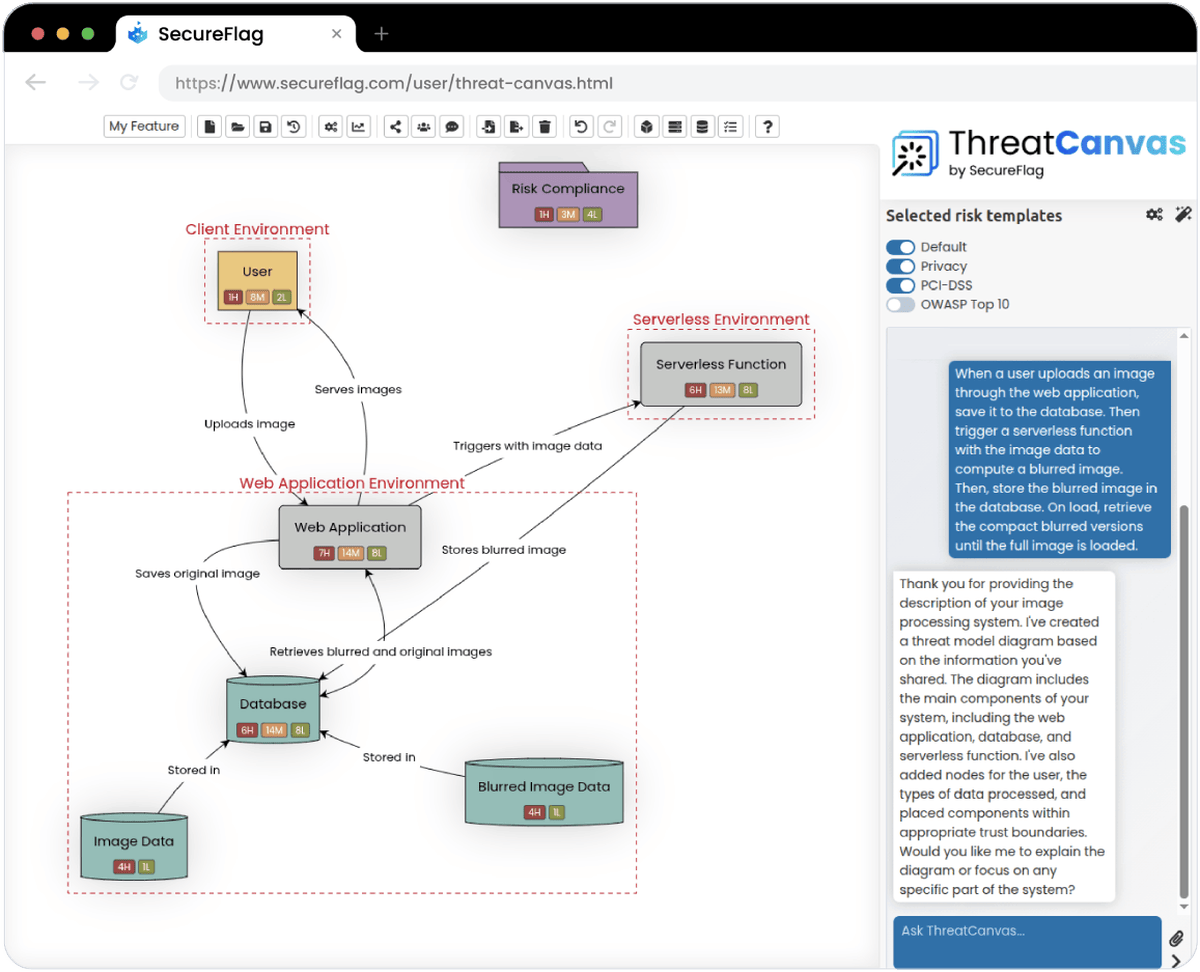
SecureFlag’s approach to threat modeling
SecureFlag built ThreatCanvas for developers, so modeling doesn’t have to wait for a specialist to be available. It works for a single feature or an entire application, and organizations can define custom template libraries for their own standards and policies instead of relying only on the built-in ones.
ThreatCanvas differs from most of the other tools in this guide in what happens after a threat is identified. Each finding can link directly to hands-on SecureFlag training, giving developers a way to practice addressing the risk they have found. It puts the whole sequence, from identifying a threat to mitigating it and learning to prevent it, in one place.
Book a demo to see SecureFlag in action.
Frequently asked questions
What are the best threat modeling tools?
There is no universal best tool. The right choice depends on factors such as the team’s threat modeling methodology, development workflow, level of automation, integrations, and compliance requirements.
Is OWASP Threat Dragon free?
Yes. It is a free, open-source OWASP project under the Apache 2.0 license, available as both a web and desktop application.
What are the 4 methods of threat modeling?
Practitioners most often cite STRIDE, PASTA, LINDDUN, and attack trees, with Shostack’s four-question framework acting as the overarching mental model that ties them together.
Is threat modeling part of DevSecOps?
Yes. Tools such as Threagile and OWASP pytm let teams define models as code, which allows modeling to sit in version control and, in Threagile’s case, run in CI/CD. It makes threat modeling a continuous pipeline activity rather than a one-off gate.
What tool does Microsoft use for threat modeling?
Microsoft uses its own free Threat Modeling Tool. The Windows desktop application drives STRIDE analysis from data flow diagrams and is used within the Microsoft Security Development Lifecycle.